
In the middle of December 2009 danish cable TV providor Stofa made most of the channels in its DVB-C network available unencoded. This prompted me to replace my analogue Hauppauge WinTV-PVR-500 TV tuner card (yes the links goes to my old PVR-150 page) with something that could record the digital signal from DVB-C. I looked for a card that had the following characteristic:
- Have stable Open Source Linux drivers
- It should work with MythTV
- Fit in a PCI slot (My Asus AT3N7A-I motherboard only has one PCI slot)
- Be able to record HD TV
- Not be to expensive
I spend a lot of time looking for information on different sites like LinuxTV wiki (direct link to TerraTec Cinergy C DVB-C) and MythTV wiki, and ended up with the TerraTec card.
Installing the card
On the physical installation I don’t have any interesting to say, it fits into the PCI slot on the motherboard without covering/blocking anything.
The “mantis” driver that the card uses is currently not in the mainline kernel, but it will be of version 2.6.33 (I’m currently on 2.6.32). So you have to download the source and build the driver yourself.
I found the “ArchVDR” project quite useful, I just followed the instructions in their wiki on how to build the s2-liplianin-hg package (scroll down to the section about s2-liplianin-hg). After building (it takes a while as there are a lot of drives in the s2-liplianin mercurial repository). When the build is complete and the package is installed, you only have to run “modprobe mantis” as root.
You can check if the driver loaded correctly by looking at the output of “dmesg”, I get the following:
Mantis 0000:01:05.0: PCI INT A -> Link[LNKA] -> GSI 18 (level, low) -> IRQ 18
irq: 18, latency: 64
 memory: 0xdffff000, mmio: 0xffffc90003f72000
found a VP-2040 PCI DVB-C device on (01:05.0),
 Mantis Rev 1 [153b:1178], irq: 18, latency: 64
 memory: 0xdffff000, mmio: 0xffffc90003f72000
 MAC Address=[00:08:ca:1e:b5:a7]
mantis_alloc_buffers (0): DMA=0x77a40000 cpu=0xffff880077a40000 size=65536
mantis_alloc_buffers (0): RISC=0x7b588000 cpu=0xffff88007b588000 size=1000
DVB: registering new adapter (Mantis dvb adapter)
mantis_frontend_init (0): Probing for CU1216 (DVB-C)
TDA10023: i2c-addr = 0x0c, id = 0x7d
mantis_frontend_init (0): found Philips CU1216 DVB-C frontend (TDA10023) @ 0x0c
mantis_frontend_init (0): Mantis DVB-C Philips CU1216 frontend attach success
DVB: registering adapter 0 frontend 0 (Philips TDA10023 DVB-C)...
mantis_ca_init (0): Registering EN50221 device
mantis_ca_init (0): Registered EN50221 device
mantis_hif_init (0): Adapter(0) Initializing Mantis Host Interface
input: Mantis VP-2040 IR Receiver as /devices/virtual/input/input4
Creating IR device irrcv0
Mantis VP-2040 IR Receiver: unknown key for scancode 0x0000
Mantis VP-2040 IR Receiver: unknown key: key=0x00 down=1
Mantis VP-2040 IR Receiver: unknown key: key=0x00 down=0
Adding the card to MythTV
I started by scanning for channels using the “scan” tool from the linuxtv-dvb-apps package in ArchLinux. None of the provided data files (in “/usr/share/dvb/dvb-c/”) contained the correct information, so I created one using information about frequency and other bits provided by Stofa:
Frekvens: 346 MHz
Netværsks-ID: 0
Modulation: 64 QAM
Symbol rate: 6900 KS
From which I created a file called “stofa”:
# Stofa
# http://www.stofa.dk/
# freq sr fec mod
C 346000000 6900000 NONE QAM64
To scan for channels using this file run: “scan stofa > channels.conf” (You can run “scan stofa” to test it without creating the channels.conf file). ****
Note: Later I have learned that importing a channels file into MythTV does not provide MythTV with enough information to get EIT (TV guide) working, but more on that later. Running the “scan” tool showed that the driver/card could find the DVB stream.
So instead of importing the channels.conf file, I made MythTV itself scan for the channels.
Mythtv setup
I started by shutting down the mythbackend, and starting “mythtv-setup”. I deleted all references to my old analogue TV card, and proceeded to setup the new Terratec Cinergy C PCI HD card. Note: I only mention the settings that I changed, the rest are left on their default setting.
Adding a new capture card
In mythtv-setup enter “Capture cards” and select “New capture card”.
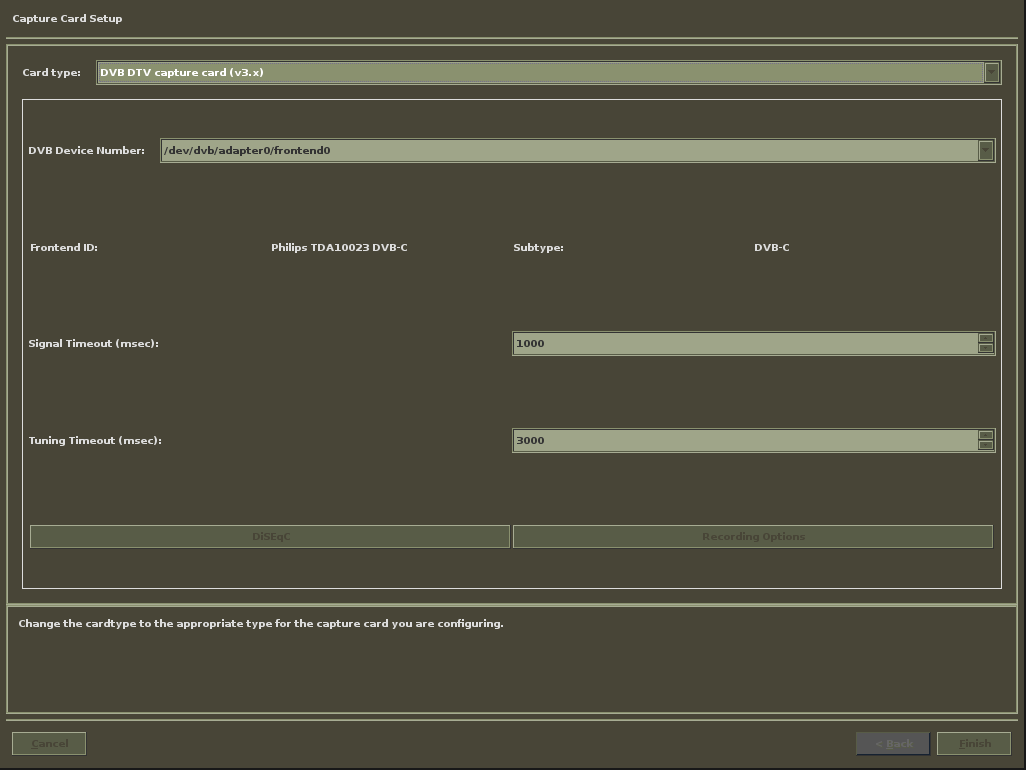
- Card type: “DVB DTV capture card (v3.x)” (DVB Device Number should change to “/dev/dvb/adapter0/frontend0” and Frontend ID should change to Philips TDA10023 DVB-C)
In “Recording options” I entered:
- Max recordings: 2 (allows you to record 2 streams simultaneously if the channels are in the same mux)
- Use DVB Card for active EIT scan: checked (should allow MythTV to get data for its TV guide from the DVB stream)
When I pressed finish, the card is listed on the capture cards page.
Adding a new video source
In mythtv-setup enter “Video sources” and select “New video source”.
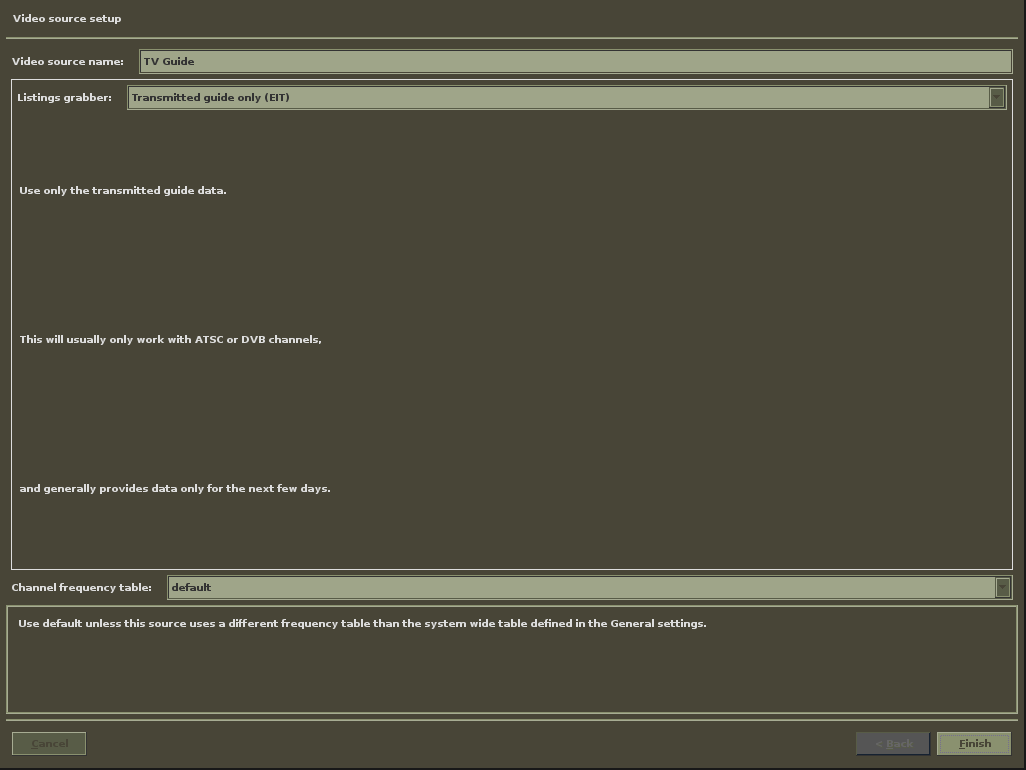
- Video source name: “TV Guide” (whatever you want)
- Listings grabber: “Transmitted guide only (EIT)”
Press finish and the source should be listed on the sources page.
Connection capture card to video source
In mythtv-setup enter “Input connections” and select the one that matches the DVB device number you got from capture cards.
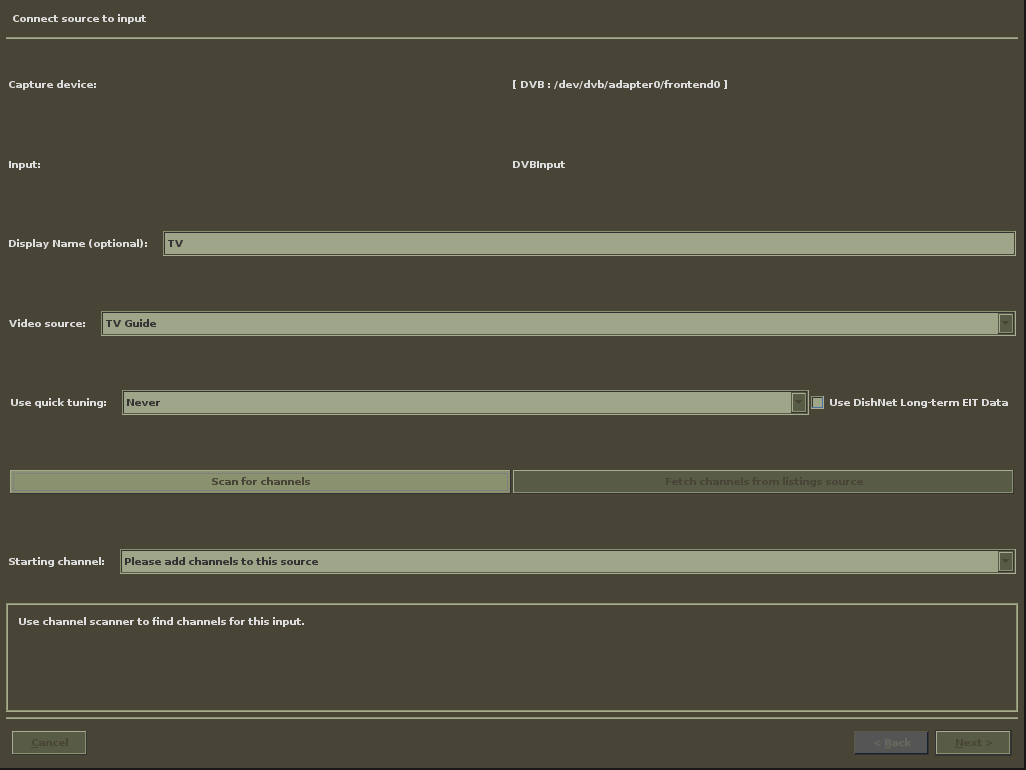
- Display Name: TV
- Video source: “TV Guide” (the one that was added previously)
Now press “Scan for channels”
Scanning for channels
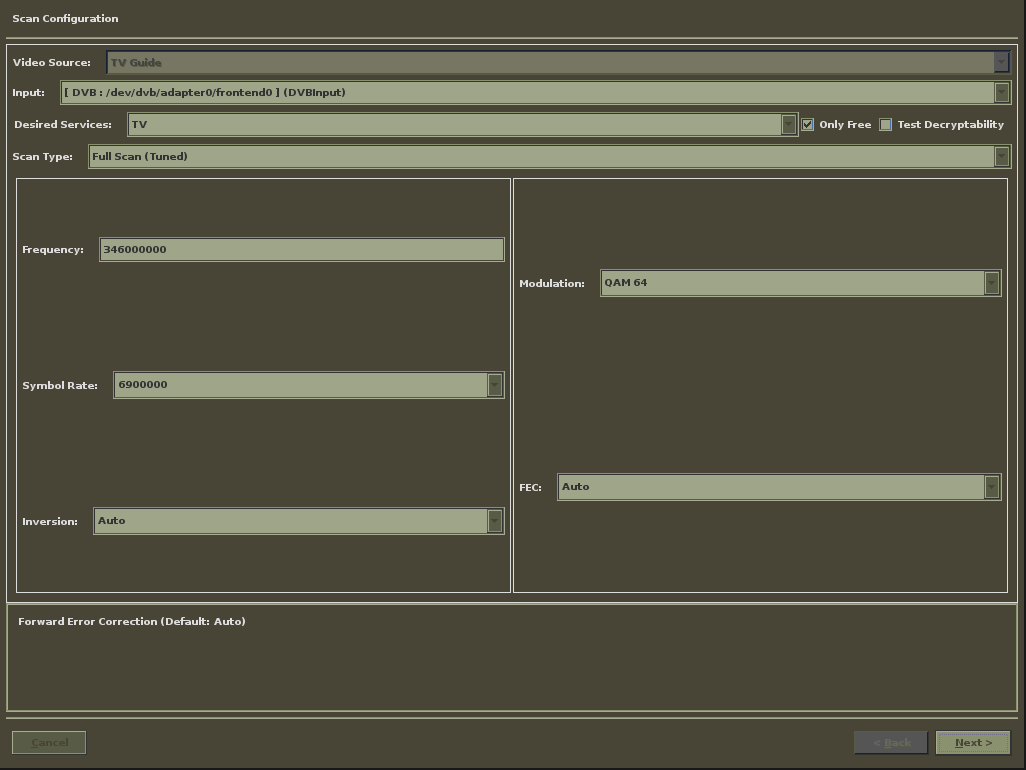
- Desired Services: TV
- Scan Type: “Full Scan (Tuned)”
- Frequency: 346000000 (based on the information from Stofa, Note: the frequency is in Hz)
- Symbol Rate: 6900000
- Modulation: “QAM 64”
When you press next MythTV should start scanning:

This takes a while, and then you should get:
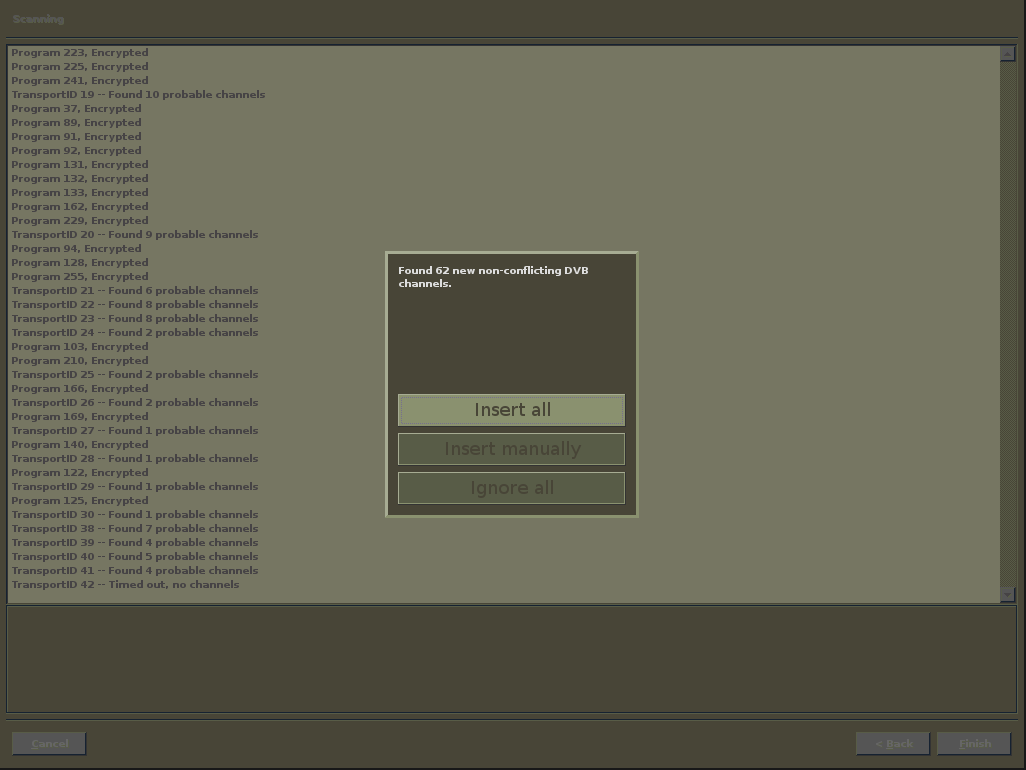
Select “Insert all” which brings you back to the input connection screen.
Channel editor
In mythtv-setup enter “Channel Editor”
Here you can see all the found channels and change their names, channel number, and so on. I did not change anything using the channel editor, but went to phpMyAdmin and changed settings like “Use on air guide” in one SQL.
This should be it, you should be able to record now :)
EIT (TV guide)
MythTV should be able to get the data for the TV guide from the DVB-C stream, but I can’t get it working. When googling the problem I learned that importing the channels.conf generated by the “scan” tool does not provide enough data for MythTV to pickup the EIT data from the stream.
To further debug the problem I set mythbackend to log messages about EIT, in ArchLinux you can edit “/etc/conf.d/mythbackend” and change LOG_OPTS to:
LOG_OPTS='--verbose important,general,eit'
So I shut the myhtbackend down, went to phpMyAdmin and truncated all tables related to channels/capture card and started over, and then let MythTV do the scan.
But I still get messages like this in “/var/log/mythbackend.log”:
2010-01-31 21:22:19.366 Program #1148 not found in PAT!
Program Association Table
 PSIP tableID(0x0) length(33) extension(0xb)
 version(27) current(1) section(0) last_section(0)
 tsid: 11
 programCount: 6
 program number     0 has PID 0x  10   data  0x 0 0x 0 0xe0 0x10
 program number  1090 has PID 0x  5a   data  0x 4 0x42 0xe0 0x5a
 program number  1098 has PID 0x  62   data  0x 4 0x4a 0xe0 0x62
 program number  1099 has PID 0x  63   data  0x 4 0x4b 0xe0 0x63
 program number  1165 has PID 0x  a5   data  0x 4 0x8d 0xe0 0xa5
 program number  1251 has PID 0x  fb   data  0x 4 0xe3 0xe0 0xfb

2010-01-31 21:22:20.120 ProcessPAT: Program not found in PAT.
 Rescan your transports.
2010-01-31 21:22:20.156 Desired program #1148 not found in PAT.
 Can Not create single program PAT.
So for the time being I have given up, but luckily I found another way to get data from the stream.
TV grab dvb plus
tv_grab_dvb_plus is a small tool that produces a xmltv file that can be imported into MythTV, just download and compile it. It worked the first time I tried it, although there are two minor issues:
- The mapping of xmltv ids to channels in MythTV
- The encoding of special characters like Danish letters (æøå)
The first issue I fixed with a small PHP script:
<?php $mysqli = new mysqli("localhost", "YOUR DB USER", "YOUR DB PASSWORD", "mythconverg"); if ($mysqli->connect_error)
{
printf("Connect failed: %s\n", mysqli_connect_error());
exit();
}

$result = $mysqli->query("SELECT chanid, serviceid FROM channel");

while ( $row = $result->fetch_assoc() )
{
$sql = sprintf("UPDATE channel SET xmltvid = '%s' WHERE chanid = %d", $row['serviceid'].'.dvb.guide', (int) $row['chanid']);

$mysqli->query($sql);
}

$mysqli->close();

?>
Remember to replace “YOUR DB USER” and “YOUR DB PASSWORD” with real values.
This script uses the serviceid from the channel table to set the xmltvid to the correct value.
The encoding issue was fixed by editing the source of tv_grab_dvb_plus. In the file “src/dvb_text.cpp” on line 133, I changed the encoding to “ISO-8859-1”:
cd = iconv_open("ISO-8859-1", cs_new);
And now it works.
All that is left is to import the produced xml file into MythTV with this command: “mythfilldatabase –file 1 dvbplus.xml” (or whatever you called the file).
Final thoughts
So far I’m pleased with the combination of the TerraTec Cinergy C DVB-C card and MythTV, although it’s not super stable, and sometimes MythTV fails to record a program, and the following messages appear in dmesg:
mantis_ack_wait (0): Slave RACK Fail !
mantis_ack_wait (0): Slave RACK Fail !
mantis_ack_wait (0): Slave RACK Fail !
mantis_ack_wait (0): Slave RACK Fail !
mantis_ack_wait (0): Slave RACK Fail !
mantis_ack_wait (0): Slave RACK Fail !
mantis_ack_wait (0): Slave RACK Fail !
I hope this problem is fixed when the 2.6.33 Linux kernel hits my machine.
To view the recorded shows I strongly recommend a Nvidia graphics card that support VDPAU.