
I recently upgraded the hardware of my desktop and here is my experience with the new hardware. The upgrade consists of:
I reused my Hauppauge PVR-500, Nvidia GS-7300 and 3x500Gb Seagate harddrives (raid5+LVM).
The motherboard with attached CPU cooler fits nicely into my Antec P182.
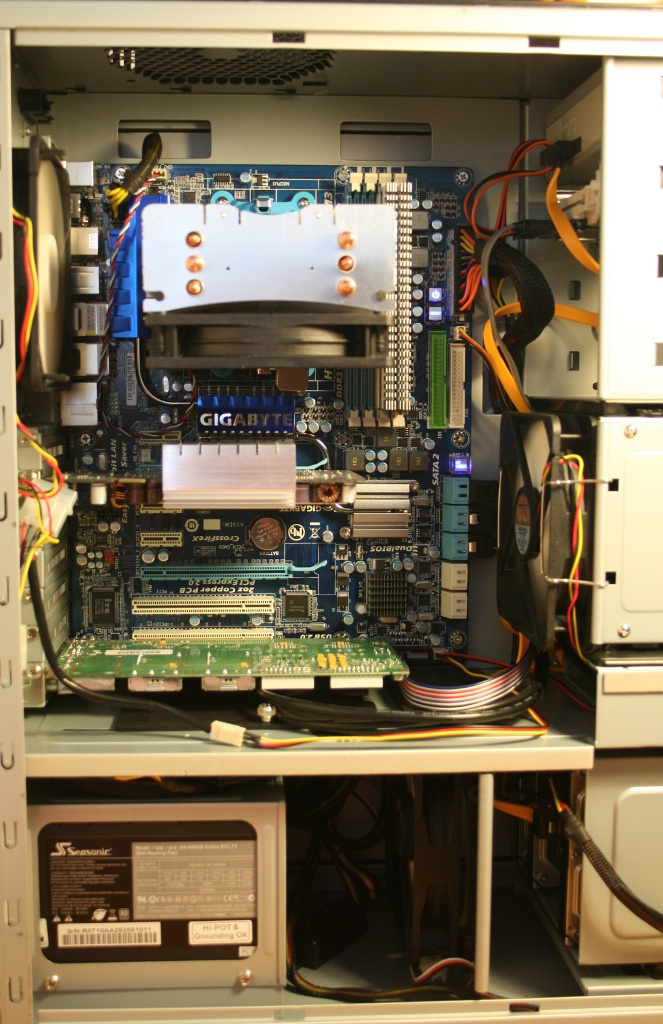
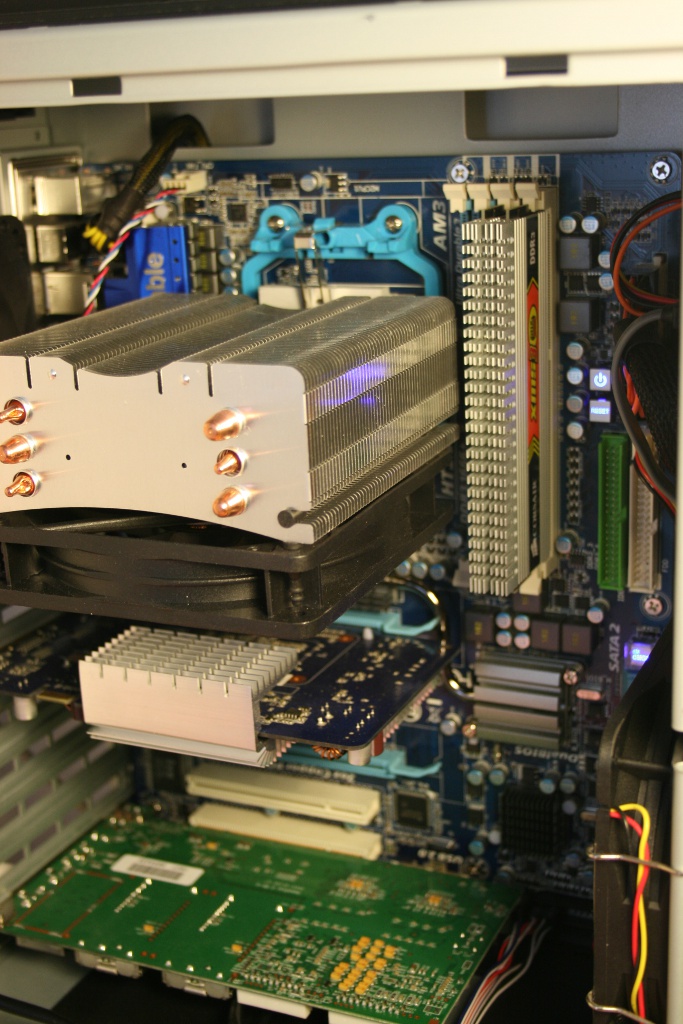
The CPU cooler can only be installed on a socket AM3 motherboard in such a way that the fan either blows up (towards the top of the case) or down (towards the PCI-e slots). When the cooler is mounted in this way, it also means that the lowest fins on the heatsink extends over the two first RAM slots. This might not normally cause any problems, but because the Corsair memory modules have headspreaders attached, they are rather tall, preventing them from being placed below the fins. The solution is to place the modules in the last 2 slots. I choose to install the cooler so the fan blows air hot upwards and out of the case’s top vents.
The default version shipped with the motherboard does not have legacy USB keyboard support enabled, which means there is no keyboard in GRUB (when Linux is booted there is no problem). I didn’t notice if there was a option to enabled it, I just updated to the newest version at the time (version F5c) which fixed it. Updating the BIOS just require a USB thumbdrive formattet with FAT32, and the extracted BIOS file (use unrar to extract it from the .exe file). While tweaking the BIOS I switched all SATA drives to AHCI, to get the most from the drives in Linux, and set the memory frequency to 1333MHz.
To match the new hardware I also switched from Arch Linux x686 to Arch Linux x86_64. I have not experienced any crashes or trouble after switching to the new hardware, so the hardware is 100% Linux compatible. There might be problems with older kernels, but I can confirm that it works with 2.6.28 or newer.
Update the 01-Aug-2009: attached dmesg
I installed lm_sensors and used pwmconfig to create a /etc/fancontrol file:
# Configuration file generated by pwmconfig, changes will be lost # cpu : temp2, pwm1, min:35, max:50 # sys1: temp1, pwm2, min:45, max:50 INTERVAL=10 FCTEMPS=hwmon0/device/pwm1=hwmon0/device/temp2_input hwmon0/device/pwm2=hwmon0/device/temp1_input FCFANS=hwmon0/device/pwm1=hwmon0/device/fan1_input hwmon0/device/pwm2=hwmon0/device/fan2_input MINTEMP=hwmon0/device/pwm1=35 hwmon0/device/pwm2=45 MAXTEMP=hwmon0/device/pwm1=45 hwmon0/device/pwm2=50 MINSTART=hwmon0/device/pwm1=150 hwmon0/device/pwm2=150 MINSTOP=hwmon0/device/pwm1=100 hwmon0/device/pwm2=100
On a hot summerday the sensors command outputs:
it8720-isa-0228 Adapter: ISA adapter in0: +1.04 V (min = +0.00 V, max = +4.08 V) in1: +1.62 V (min = +0.00 V, max = +4.08 V) in2: +3.28 V (min = +0.00 V, max = +4.08 V) in3: +2.96 V (min = +0.00 V, max = +4.08 V) in4: +3.07 V (min = +0.00 V, max = +4.08 V) in5: +1.97 V (min = +0.00 V, max = +4.08 V) in6: +4.08 V (min = +0.00 V, max = +4.08 V) in7: +2.16 V (min = +0.00 V, max = +4.08 V) Vbat: +3.25 V fan1: 198 RPM (min = 0 RPM) fan2: 941 RPM (min = 0 RPM) fan3: 0 RPM (min = 0 RPM) fan4: 0 RPM (min = 0 RPM) fan5: 521 RPM (min = 0 RPM) temp1: +48.0°C (low = +127.0°C, high = +127.0°C) sensor = thermistor temp2: +40.0°C (low = +127.0°C, high = +60.0°C) sensor = thermal diode temp3: +45.0°C (low = +127.0°C, high = +127.0°C) sensor = thermistor cpu0_vid: +1.550 V
To get the most from a multicore CPU some appliations needs to be configured to use all cores.
I use the ondemand CPU frequceny scaling governor, so most of the time all four cores run at 800MHz and only switch to 2.6GHz when it is needed. I have put the following in my /etc/rc.local:
for i in 0 1 2 3; do
echo ondemand > /sys/devices/system/cpu/cpu${i}/cpufreq/scaling_governor
echo 1 >/sys/devices/system/cpu/cpu${i}/cpufreq/ondemand/ignore_nice_load
done
July 31, 2009 at 01:54
Could you possibly post the ‘dmesg’ output produced after Linux is booted upon this mainboard?
I currently have a Foxconn A79A-S which I’m looking to replace (although recent BIOS updates have improved things, it still has many unresolved issues) and I’m keen to try to avoid making the same mistake again…
August 1, 2009 at 19:16
Sure, I have added it to the post
October 8, 2009 at 21:09
I had a MS_XP/ubuntu 9.04 (32bit) dual boot on a WD 64Gb hard drive on the blue sata connectors pos. 0, all default in bios. I bought 2 Samsung 1Tb hd and upon changing the bios to allow raid, broke my OS installs. I chatted with Gigabyte and they said “drives connection need to be connect single WD drive to White color, set to SATA /IDE control mode to AHCI, after OS install to WD drive as boot drive ( note : provide GSATA AHCI driver turning OS installation) then connect 2x SATA drives to blue color, set onchip SATA type to Raid, then on second boot screen press Ctrl +F to in AMD Raid bios create Raid 1 mirror, boot system to windows if Raid drive not show, go to diskmanagement it will show there but grayout, right click on it initial drive, then right click on it again partition and format drive as NTFS, drive will show and work in windows as storage drive.”
I don’t want XP anymore. I just want a stable install (ubuntu server)on the WD drive and would like to software raid through mdadm later.
what connectors did you use for your harddrives, how did you use Ahci without the driver install, did you change both the Sata control mode and the onchip sata type to Ahci?
sorry for the long post but thankns
December 11, 2009 at 01:47
Hey finished building my rig some days ago!
I’m too using the same mobo with an phenom II x4 955 be and a scythe mugen2.
Now, when i’m running sensor-detect he doesn’t get my any sensors… only someth like “Chip `AMD K10 thermal sensors” ‘driver-to-be-writen”.
Im using Karmic Koala 64bit (mainpartition), with win7 64bit (gamepartition) as dualboot system. (should i switch to ahci too?)
You know another way to monitor the temps?
thanks in advance!
December 20, 2009 at 17:42
My advice would be: ditch the Fake raid in the bios and use software raid in Linux. It has worked fine for me for a long time.
December 20, 2009 at 17:45
I just use lm-sensors, I’ve try to get hold of my /etc/sensors3.conf for that machine (it’s currently offline, as I have moved the harddrives to my Atom based NAS)
December 22, 2009 at 01:25
I`m having problems with my motherboard to.
Running ubuntu x64 and getting this:
I will now generate the commands needed to load the required modules.
Just press ENTER to continue:
To load everything that is needed, add this to /etc/modules:
#—-cut here—-
# Chip drivers
# no driver for AMD K10 thermal sensors yet
#—-cut here—-
January 31, 2010 at 21:29
Yes, I don’t think there is dedicated thermal sensor driver for the AMD Phenom, but if I load the “it87″ I get a reading:
temp3: +31.0°C (low = +127.0°C, high = +127.0°C) sensor = thermistor
If I generate a high load on the machine, the reading will show a higher temperature and fancontrol will increase the fan speed on the CPU heatsink, and when the load goes down, so will the temperature reading.
February 16, 2010 at 14:05
Does anybody has used the 4 extra satas as a normal sata disc under mdadm?
Thanx in advance
February 17, 2010 at 20:54
I only used the first 3 for my RAID 5 setup, but I don’t see why it shouldn’t work. Just set everything to AHCI.
August 21, 2010 at 19:01
hi
i have a similar computer (ma790fxt-ud5p/sempron 140/1Gb) under ubuntu server 10.04. did you experienced network issues ? i have only 35/40 Mo/s while transferring data with samba on gigabit lan.
September 19, 2010 at 19:46
Hi Henrik, I have the same sensor chip “it8720-isa-0228″, even though my motherboard is different from your. Mine is a GA-890FXA-UD5.
Anyway, are you sure that temp3 is the cpu temp?
I installed k10temp driver, whith the procedure at this link:
http://newyork.ubuntuforums.org/showthread.php?t=1287819
This is my sensors command output:
k10temp-pci-00c3
Adapter: PCI adapter
CPU Temp: +30.5°C
it8720-isa-0228
Adapter: ISA adapter
Vcore: +0.99 V (min = +0.00 V, max = +4.08 V)
Vram DDR3 1.5V: +1.52 V (min = +0.00 V, max = +4.08 V)
+3.3V: +3.30 V (min = +0.00 V, max = +4.08 V)
in3: +3.04 V (min = +0.00 V, max = +4.08 V)
in4: +3.10 V (min = +0.00 V, max = +4.08 V)
in5: +1.94 V (min = +0.00 V, max = +4.08 V)
in6: +4.08 V (min = +0.00 V, max = +4.08 V) ALARM
in7: +2.16 V (min = +0.00 V, max = +4.08 V)
Vbat: +3.22 V
CPU fan: 283 RPM (min = 10 RPM)
fan2: 0 RPM (min = 0 RPM)
fan3: 0 RPM (min = 0 RPM)
fan4: 0 RPM (min = 0 RPM)
temp1: +35.0°C (low = +127.0°C, high = +127.0°C) sensor = thermistor
temp2: +29.0°C (low = +127.0°C, high = +60.0°C) sensor = thermal diode
temp3: +34.0°C (low = +127.0°C, high = +127.0°C) sensor = thermistor
cpu0_vid: +0.575 V
CPU Temp and temp3 don’t match, 30° vs 34°, there is a big difference.
Also I would like to change labels (in /etc/sensors3.conf) of line3, line4, etc…. Can you help me to understand the values? I changed only the first three values (Vcore, Vram,+3.3V), but all the others whaht are, what they refer?
I think in6 is the +5V line, am I right?
At last, I don’t see the line of +12V, why? BIOS has that voltage!
Thank you, sorry for the long post (and for my bad english).
March 3, 2011 at 18:39
From what I’ve read while researching sensors on another Gigabyte board (GA-890FXA-UD5) with the same sensor chip, I believe temp2 is the CPU temp. Temp1 is the system, temp3 is the northbridge.